Inside Weigh Work

One dossier per opportunity. Everything you'd want to know, in one place.

A look at the screens you'll live in most, and at what it produces along the way.

01 · Dashboard

See every opportunity, and where it actually stands

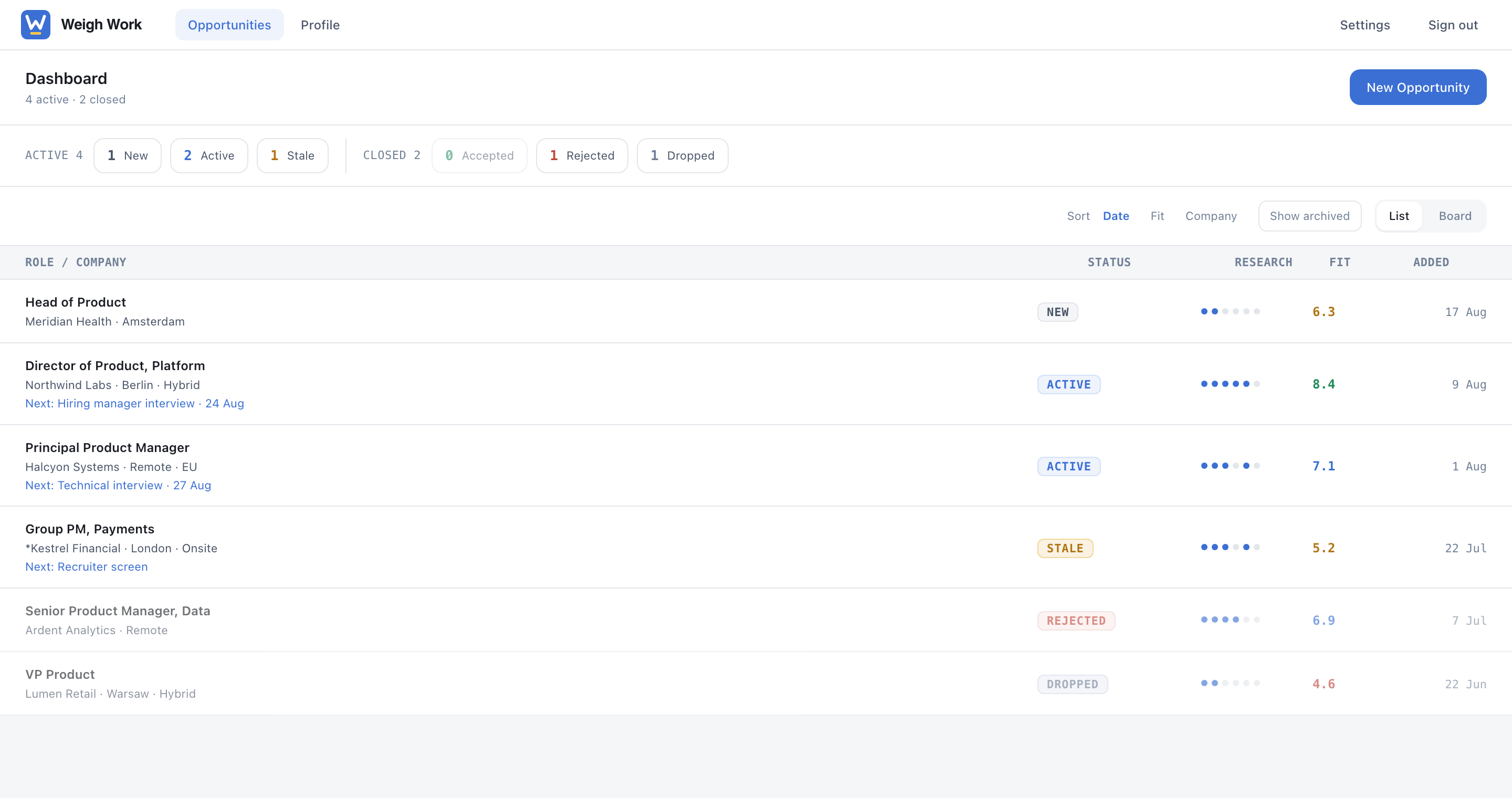
Status, fit score, and research progress for every role you're pursuing, with a clear "next step" so nothing quietly stalls.

  • New · Active · Stale · Offer · Rejected · Accepted, at a glance
  • Fit score coloured by band, so weak matches don't hide
  • List or board view, sorted by what's most urgent
The Weigh Work dashboard listing tracked opportunities with status, fit score and research progress
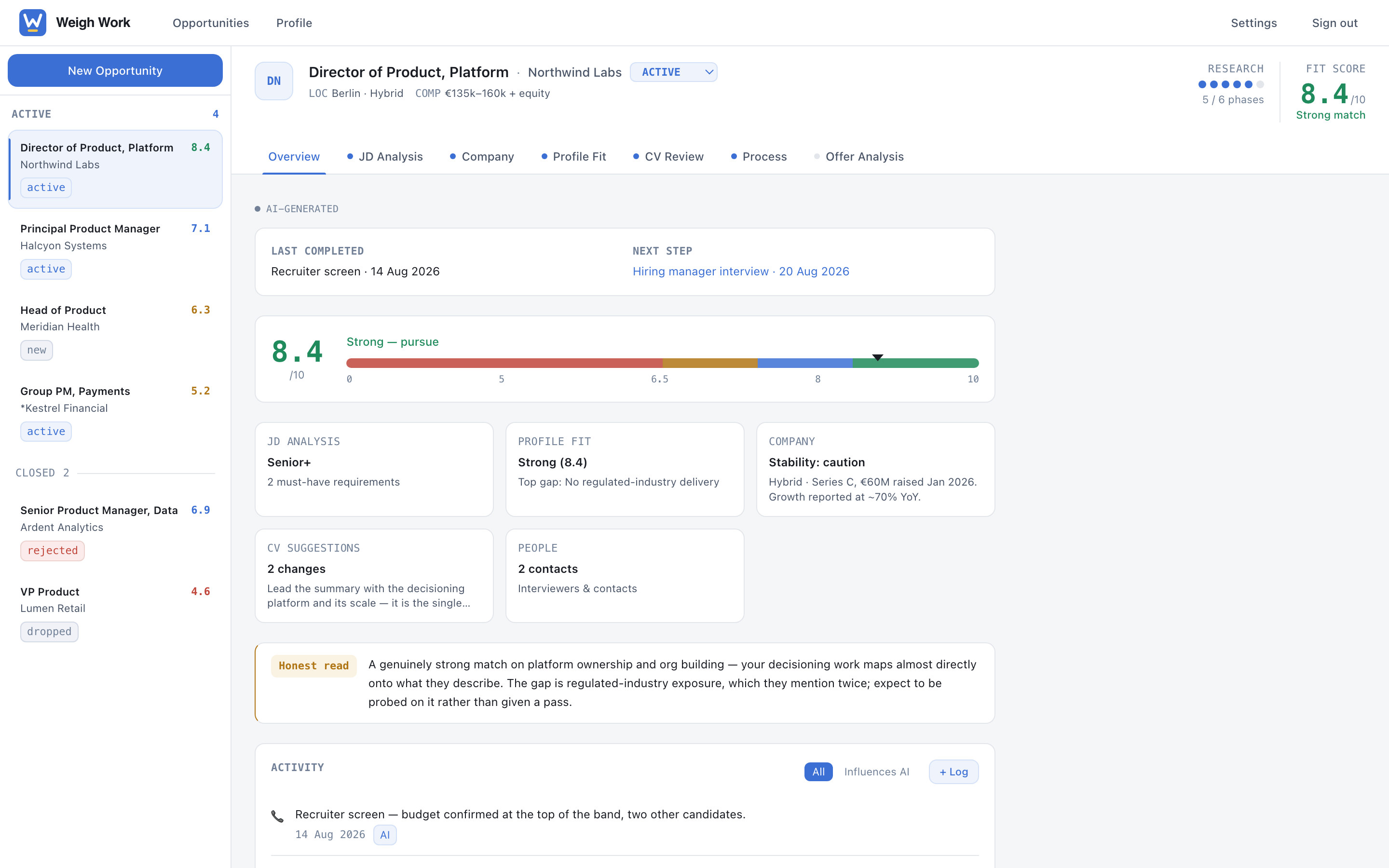
A single opportunity dossier showing fit score, company research highlights and the honest read
02 · The dossier

A straight read on fit, and a tracker that keeps you moving

A dossier is everything Weigh Work knows about one job: the posting, the company, your fit, your tailored CV, the people you'll meet, and your notes. Job description, company, fit, CV, people, and call prep, all built from one profile. The research compounds instead of resetting each time.

  • The "honest read": gaps and red flags named plainly, never softened
  • A process tracker with dates, stages, and slip warnings
  • Every run kept as a version, so you can see what changed and when
The number everyone asks about

What the fit score actually means

The fit score compares what a posting requires against what your CV and profile show, informed by whatever the company research turned up. It runs from 0 to 10, and it always comes with the reasoning: which requirements you meet, which you don't, and which ones the posting is vague about.

8.0 – 10
Strong match

You meet the core requirements. Worth a properly tailored application.

6.5 – 7.9
Good match

A real chance with gaps you can address. The analysis names which ones and how.

5.0 – 6.4
Mixed

Meaningful gaps. Worth applying only if something specific about the role justifies the effort.

below 5.0
Weak

The requirements and your experience don't line up. Usually better spent on another role.

What it isn't: it is not a probability of getting hired, and it is not an ATS score. It doesn't know how many people applied or who they are. It is a structured second opinion on one question — how well does this posting match this CV — and you're meant to argue with it. It's also useful in the other direction: a very high score on a role well below your level is worth noticing.

03 · Your profile

One CV and baseline, reused everywhere, fully in your control

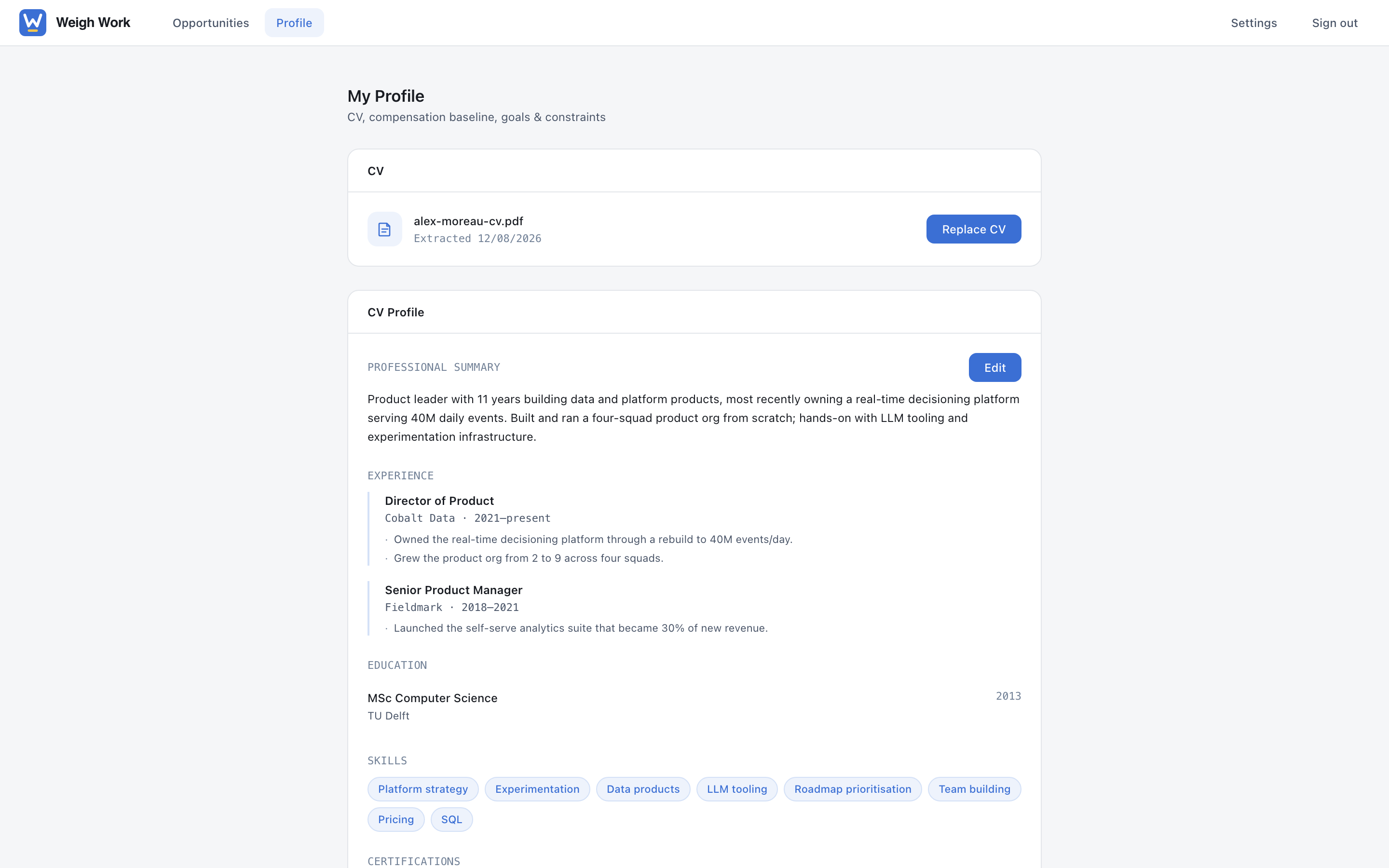
Your CV and compensation baseline power fit scoring and offer evaluation across every opportunity. Nothing leaves this profile without you.

  • Upload or import your CV once; it informs every dossier
  • Set a compensation baseline to unlock offer evaluation
  • A full legal and privacy section, with export or deletion at any time
The profile screen showing an imported CV, experience, education and skills
What it produces

Concrete output, not encouragement

Two phases do the work most people dread. Both draw on the same dossier, so the advice is about this role rather than roles in general.

CV crafting, per opportunity

Weigh Work reads the job description against your CV and tells you what to change for this role: which experience to lead with, which claims to quantify, and which vocabulary from the posting you're missing.

  • Section-by-section suggestions, each with a priority and a worked example
  • Missing keywords pulled from the posting's own language
  • Applicant tracking system detected where possible, with formatting notes that match it
  • A tailored draft you approve before it becomes a PDF

Call prep that names the hard parts

Before each conversation you get the questions you're likely to face, the gaps someone will probe, and the things worth asking back, drawn from the company research and the people on the other side of the table.

  • Likely questions, with the weak spots in your story flagged first
  • People pages: who you're meeting, and what they're known to care about
  • Questions worth asking, specific to what the research turned up
  • Prep tied to the stage you're actually at, not a generic checklist
Plain definitions

What the words on the screen mean

Dossier
Everything Weigh Work knows about one job: the posting, the company, your fit, your tailored CV, the people you'll meet, and your notes.
Research phases
The six passes a dossier goes through: the role, your fit, the company, your CV, interview prep, and the offer. Each one can see everything the earlier ones found.
Research progress
How many of those six phases have been run for this job. Nothing is hidden behind it — it's a count, not a quality score.
Fit score
A 0–10 comparison of what the posting requires against what your CV shows, with the reasoning attached. See the section above.
The honest read
The part of the analysis that names gaps and red flags without softening them. It's deliberately blunt; that's the point of it.
Confidence label
Every claim about a company is marked confirmed (found in a named source), inferred (reasonable but not stated), or unverified (worth checking yourself).
Stale
A job you haven't touched, and that hasn't moved, for long enough that it's probably slipping. Flagged so you notice before it's gone quiet for three weeks.
Baseline
What you currently earn, plus what you'd need to move. Offer evaluation compares against it. Nobody but you ever sees it.
How the analysis works

Every analysis in Weigh Work is generated by AI.

Weigh Work sends your CV, your notes, and the opportunity details to Anthropic's Claude with a structured prompt for each phase, then turns the response into the panels you see. That's why outputs carry confidence labels. They're a well-researched draft to argue with, not a verdict. Nothing is decided about you automatically, and nothing is sent to an employer.

For people who use AI assistants

Reachable from the assistant you already use

Weigh Work can connect to an AI assistant such as Claude, so you can ask it what's gone stale or have it log a call you just finished. Every connection is limited to exactly what you allow, and nothing can be deleted through it.

See it on your own opportunities

Weigh Work is currently invite-only for personal use.

Request access